
Screenshots


App details
- Updated
- Apr 10, 2006
- Language
- English
- Developer
- Guliverkli
- Category
- Mobile
SoftPas in:
This product is also available in the following languages:
About Media Player Classic XP-2000
Download Media Player Classic XP-2000 – media player, video player, audio player, DivX, DVD playback, file format support, Windows XP, Windows 2000, portable, no installation
Overview
Media Player Classic XP-2000 is a lightweight, feature-rich media playback application designed for users seeking a reliable alternative to the built-in Windows Media Player. Developed specifically for legacy Windows environments, the app supports a broad spectrum of audio and video file formats, enabling seamless playback across diverse media types. Its primary purpose is to deliver a stable and customizable media experience, particularly for users still operating on Windows XP or Windows 2000 systems.
The application addresses common playback limitations by offering enhanced compatibility with formats such as DivX, MPEG, AVI, MP4, WMV, and various audio codecs including MP3, WAV, WMA, OGG, and MIDI. This makes it especially valuable for users managing older or non-standard media files that may not play correctly in default Windows players. It also supports DVD playback and audio CD functionality, further expanding its utility as a comprehensive multimedia tool.
Target users include individuals with older hardware or software environments who require a dependable, lightweight media player without the need for installation. The app is particularly useful for those who value portability and quick access, as it can be run directly from a USB drive or local folder. While the developer, Media Player Classic, did not provide additional background details, the app’s long-standing presence in the niche ecosystem suggests a dedicated user base and proven reliability. Its continued relevance underscores its role as a functional utility in the broader context of legacy software solutions.
Key Features & Functionality
- Comprehensive File Format Support – The app supports a wide array of audio and video formats, including WAV, WMA, MP3, OGG, MPEG, MPG, AVI, MP4, WMV, VOB, AC3, DTS, ASF, ASX, M3U, PLS, WAX, CDA, JPEG, GIF, PNG, BMP, D2V, SWF, MOV, and QT. This ensures minimal compatibility issues when playing diverse media files.
- Optimized DivX Playback – Designed with a focus on DivX video compatibility, the app delivers smooth playback for this widely used codec, making it a preferred choice for users with DivX-encoded content.
- Full Configuration Options – Users can customize playback settings such as resolution, window size, and display output, allowing adaptation to different screens, including TVs or projectors, for an optimized viewing experience.
- Portable Operation – No Installation Required – Media Player Classic XP-2000 runs directly from a folder without requiring installation. This feature enhances portability, enabling use across multiple systems without leaving traces or requiring administrative privileges.
- Compatibility with Windows XP/2000 – Built specifically for these legacy operating systems, the app ensures stable performance and reliable playback on older hardware and software environments.
For example, a user with a collection of DivX movies can play them without conversion, while another may use the app to present media on a projector by adjusting the resolution and aspect ratio. The lack of installation also makes it ideal for temporary use on public or shared computers.
Interface, UX & Performance
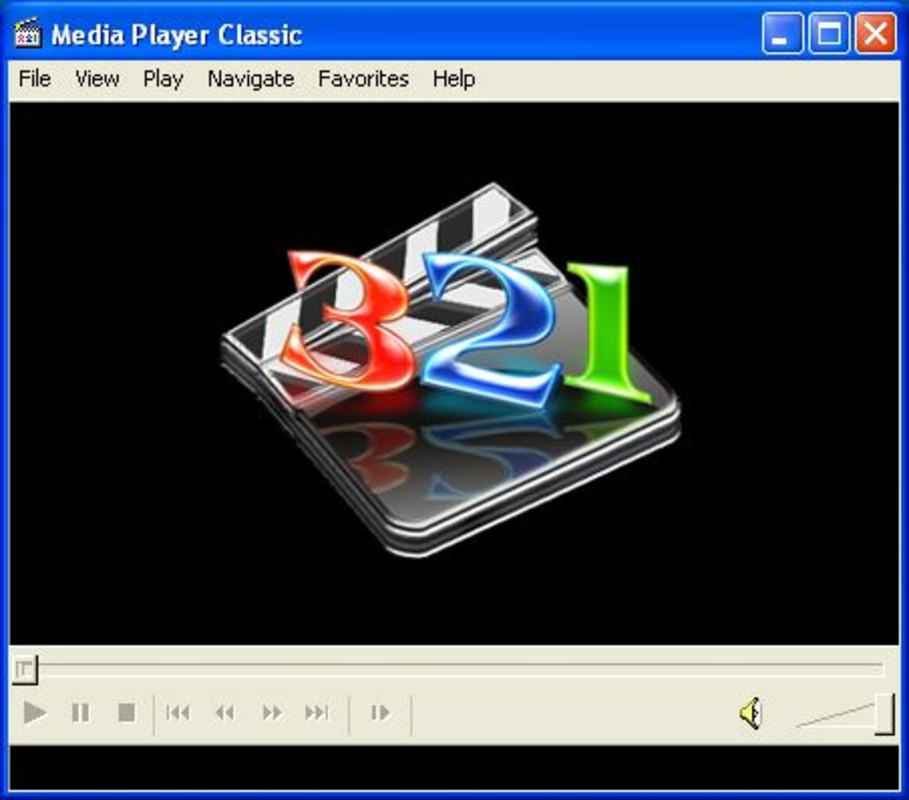
The user interface of Media Player Classic XP-2000 reflects a minimalist, no-frills design typical of early 2000s media players. It features a clean layout with essential playback controls—play, pause, stop, volume, and seek—positioned within a straightforward window. Navigation is intuitive, relying on standard keyboard shortcuts and mouse interactions, which ensures accessibility for users familiar with basic media playback tools.
Although the developer did not list formal performance metrics, the app’s small file size of 1.2 MB suggests efficient resource usage. It is designed to operate smoothly on systems with limited processing power and memory, making it suitable for older machines. Responsiveness is expected to be high, given the lack of background processes and installation overhead.
Stability appears to be a core strength, as the app has been used for years without widespread reports of crashes or playback failures. However, since the developer did not disclose detailed system requirements or testing environments, performance on modern hardware or operating systems remains unverified. Users should expect a lightweight, predictable experience on its intended platforms.
Platform Compatibility & Technical Requirements
Media Player Classic XP-2000 is designed for the Windows platform and specifically targets Windows XP and Windows 2000 operating systems. The software version is 1.0, with a file size of 1.2 MB, making it highly compact and suitable for storage on small drives or removable media.
The developer did not specify minimum OS requirements beyond the two listed platforms. Compatibility information was not fully disclosed, so users on newer Windows versions (such as Windows 10 or 11) may encounter installation or runtime issues. Similarly, specific hardware requirements were not provided, though the app’s lightweight nature suggests it can run on systems with modest specifications.
Given its age and targeted environment, the app is not expected to function natively on modern operating systems. Users should verify compatibility before attempting to run the application on updated systems.
Pros and Cons
Pros
- Supports a wide range of audio and video file formats
- Optimized for DivX and DVD playback
- Runs without installation – fully portable
- Lightweight and efficient with minimal system impact
- Designed for stable performance on Windows XP and 2000
Cons
- Not compatible with modern Windows operating systems
- No official updates or technical support available
- Outdated user interface with limited modern features
- Developer did not provide detailed system requirements
- May lack security updates for older codebase
FAQ
Is Media Player Classic XP-2000 free to download and use?
Yes, the app is available at no cost. It is distributed as a free utility for users of Windows XP and Windows 2000.
Can I run this app on Windows 10 or Windows 11?
While the app was designed for Windows XP and 2000, it may not function properly on newer operating systems due to changes in system architecture and compatibility layers. Users are advised to test it in a virtual environment if necessary.
Does the app require installation?
No, Media Player Classic XP-2000 is a portable application. It can be run directly from a folder or USB drive without installation.
What file formats does it support?
The app supports a broad range of formats including MP3, WAV, WMA, AVI, MP4, WMV, MPEG, DivX, DVD, audio CDs, and various image formats for slideshow playback.
Is the app secure to use?
As a legacy application, it has not received security updates. Users should exercise caution when opening media files from untrusted sources. Running it on isolated or virtual machines is recommended for safety.
Final Thoughts
Media Player Classic XP-2000 remains a functional and reliable tool for users still relying on Windows XP or Windows 2000 systems. Its extensive file format support, focus on DivX and DVD playback, and portable nature make it a valuable utility in legacy computing environments. While it lacks modern features and is incompatible with current operating systems, its simplicity and efficiency continue to serve niche users who prioritize stability and compatibility over cutting-edge design.
For those managing older media collections or working with limited hardware, this app offers a dependable playback solution without the need for installation or system overhead. It stands as a testament to the enduring utility of well-designed, lightweight software.
Download Media Player Classic XP-2000 now
Guides & Tutorials
How to install Media Player Classic XP-2000
- Click the Download button above.
- Once redirected, accept the terms and click Install.
- Wait for the Media Player Classic XP-2000 download to finish on your device.
How to use Media Player Classic XP-2000
This software is primarily used for its core features described above. Open the app after installation to explore its capabilities.
User Reviews
No reviews yet. Be the first to share your experience.
You may also like
more
Que no te pillen¡
About !Que no te pillen¡Reviewed by Jason A. BilbreyShow MoreShow Less

3D Combat Zone
About 3D Combat ZoneOriginally released in 1983, 3D Combat Zone immerses players...

666: El día del portal
About 666: El día del portalOn June 6, 2006, Agent P. Stone uncovers a sinister...

80 in 1 Best Flash games
About 80 in 1 Best Flash games 80 in 1 Best Flash games is a collection of 80 fl...

ABYSS SEEKERーーWhat Do You See Deep in The Abyss
About ABYSS SEEKERーーWhat Do You See Deep in The AbyssIn ABYSS SEEKER, players...

ACA NEOGEO THE KING OF FIGHTERS 2002 for Windows
About ACA NEOGEO THE KING OF FIGHTERS 2002 for WindowsTHE KING OF FIGHTERS 2002,...